
Creator Chronicles Farming & Production: Targets, Worker Levels and Shortages
Use Production Control, Target Production and Fixed Count, set queue priority, and diagnose missing materials or workers in Creator Chronicles 1.19.
Oct 30, 2026
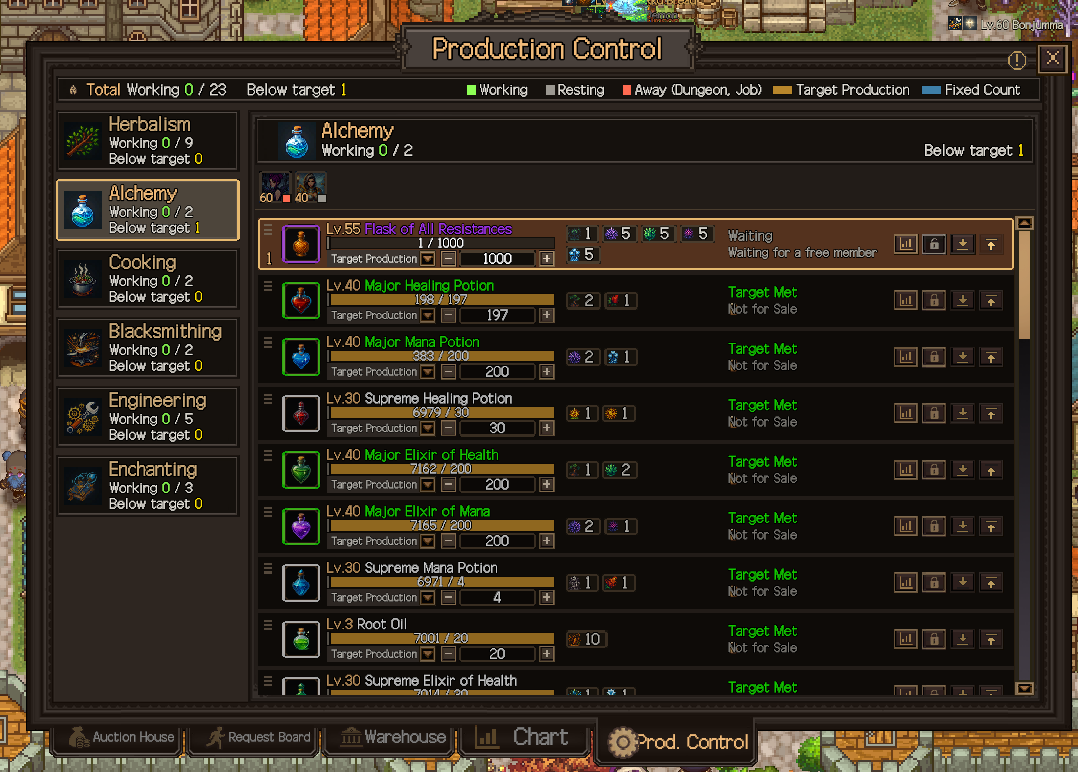
Press X to open Production Control. Choose a stock target or finite production count, move eligible priority jobs higher, then check the panel for materials, worker and waiting reasons.
 Official Steam screenshot
Production Control: fix the queue in version 1.19
Press X or use the shortcut in Resources to open Production Control. It covers Herb/Herbalism, Alchemy, Cooking, Blacksmithing, Enchanting and Engineering. Start with the category that makes your missing dungeon supply.
Target Production or Fixed Count?
| Mode | What you set | Use it for |
|---|---|---|
| Target Production | A stock level to maintain | A buffer of food, potions or ingredients that you expect to consume repeatedly. |
| Fixed Count | How many more times to produce, separately from current stock | A finite batch for the next crafting or discovery goal. It is a production count, not a promise of one output item per craft. |
The quantity limit is now 10,000, up from 1,000. Set the amount you need rather than raising every target to the limit. An item can be at its stock target even while a separate recipe still needs an ingredient.
Set priority, then read the reason for a stop
Drag items or use Move to Top / Move to Bottom. Among items that meet their production conditions, items higher in the list are produced first. A large target number alone is no longer the instruction for queue priority.
| Status or condition | Next check |
|---|---|
| Not enough materials | Inspect the recipe inputs and their upstream production before raising the output target. |
| No Eligible Member | Check the required profession and level against the available roster. |
| Waiting | Check current worker activity and higher-priority eligible jobs; the panel shows who is crafting, resting or away. |
| Target Met | Production has reached its stock goal; raise it only if you need a larger buffer. |
| Not for Sale | Sale Lock is protecting the item; this is separate from choosing a production mode. |
Newly discovered production items appear at the top. Recheck the queue after a discovery so a new recipe does not displace the supply you wanted first. Reached targets keep their positions.
Batch edits and reserves
Use Ctrl+Click for several items, Shift+Click for a range, or Ctrl+A for discovered items in the current category. You can change mode, quantity, Sale Lock and priority together; check the selection before a batch edit.
For an individual resource, set Keep in Stock below Owned Quantity. Its Used In list links to recipes consuming that material. Use this to trace an ingredient shortage before making more unrelated stock. The crafting guide shows how to work back from your next goal.
Why production is stuck
| Check | What to look for | Action |
|---|---|---|
| Town requirement | Facility/recipe not available yet | Advance the relevant town/Discovery requirement |
| Materials | Input stock at zero | Gather, buy or raise upstream target |
| Worker | Wrong profession or level too low | Recruit/level the required specialist |
| Target | Item already at target quantity | Raise target only if you actually need more |
Set targets as a buffer, not a vanity number
- In version 1.19, eligible jobs follow their order in Production Control. Set quantity and priority separately.
- It also shows that a member below the item’s required production level cannot make that item.
- Official Demo V5 notes added direct numeric input and clearer failure reasons, making target-based automation easier to manage.
- Keep dungeon consumables above your next-run requirement; keep sale stock lower if you are short on inputs.
Protect supplies from your own economy
Sale protection
The long-form footage notes that customers can create shortages even during automatic production, and recommends locking critical items to prevent sales. That is especially useful for potions or ingredients you are reserving for a dungeon push.
Alchemy as the first complete chain
- Recruit Herbalism coverage.
- Set herb targets instead of manually harvesting forever.
- Build/unlock the Alchemy facility when the quest chain reaches it.
- Recruit or assign Alchemy coverage.
- Set potion buffers based on the next dungeon party, then lock the minimum reserve.
Patch 1.02 note (September 16)
Construction costs for houses and farmland were adjusted in patch 1.02, so older screenshots of build prices in this guide may be high. Recheck the cost in your own build before committing a plot.
Patch 1.07–1.09 production notes (September 21–23)
- Gathering in dungeons. Since 1.07, members with Mining, Herbalism or Fishing gather extra resources inside dungeons when they are in a good Mood — a second income stream that depends on Mood management.
- Supplies come from members. 1.09 replaced the “members buy extra dungeon supplies with personal gold” system with donations to the town based on Personality and Mood, so your supply buffer now depends on who is in the guild and how they feel.
- Production list clarity. The list shows owned quantity alongside the production target, under-target items are highlighted, and the Meat target stays hidden until you learn Protein Conversion.
- Recipes you already know drop again. Crafting recipes discovered earlier can now be acquired normally when they drop in dungeons (1.09).
Patch 1.11 check (September 25)
Patch 1.11 did not change farms, production or the resource chain — its notes cover Thai localisation, the Affinity/passive stat-application order, Battle Replay and roster/dungeon interface quality-of-life. Production targets from this page carry over unchanged.
Patch 1.12–1.13 check (September 26–27)
- Protein Conversion was skipping Meat production (1.13) — fixed. If you had the “Protein Conversion” town skill and Meat could be made from Fish, the game was skipping the Meat output anyway. Restaurants and any production chain that expects Meat from fish should now yield it; check your per-cycle output against the targets on this page after updating.
- Manual production failures now name the cause (1.13): “Not enough materials”, “Undiscovered materials”, or “Town level too low”, with the specific items listed. That makes it much faster to tell a genuine supply shortfall from a locked recipe.
- Nothing in 1.12 changes farms or the resource chain — its production-adjacent entries are the character-creation stat-point warning, translation review and battle-log sign fix.
Patch 1.14 check (September 28)
- Guild members now eat dishes they own when the town has no Bread. The higher the dish grade, the longer they stay full. That makes cooked output a real buffer rather than a saleable-only resource: a run of good dishes in member inventories now covers a Bread outage instead of costing mood.
- Skill Book Pages and some crafting Recipes had their base purchase price lowered. Auction House floors on those two categories move with it, so pre-1.14 price targets on this page are stale — re-check the base price before restocking.
- Nothing else in 1.14 touches farms or the resource chain. The rest of the patch is raid result screens, Affinity maths, equipment progression and interface polish.
Launch content (September 15, 2026)
- The full release unlocks higher-tier goods — rare herbs, potions and elixirs — as the farm, mine and alchemy lab progress. Update your production targets upward instead of stockpiling low-tier surplus.